The right way to write links

A hyperlink is a decluttering tool. It lets you move supporting material out of the sentence and behind a word or phrase, so the text stays clean and the reader who wants the detail can still reach it. This works for a quick email as much as a full report.
The question is not whether to use links but how to present them.
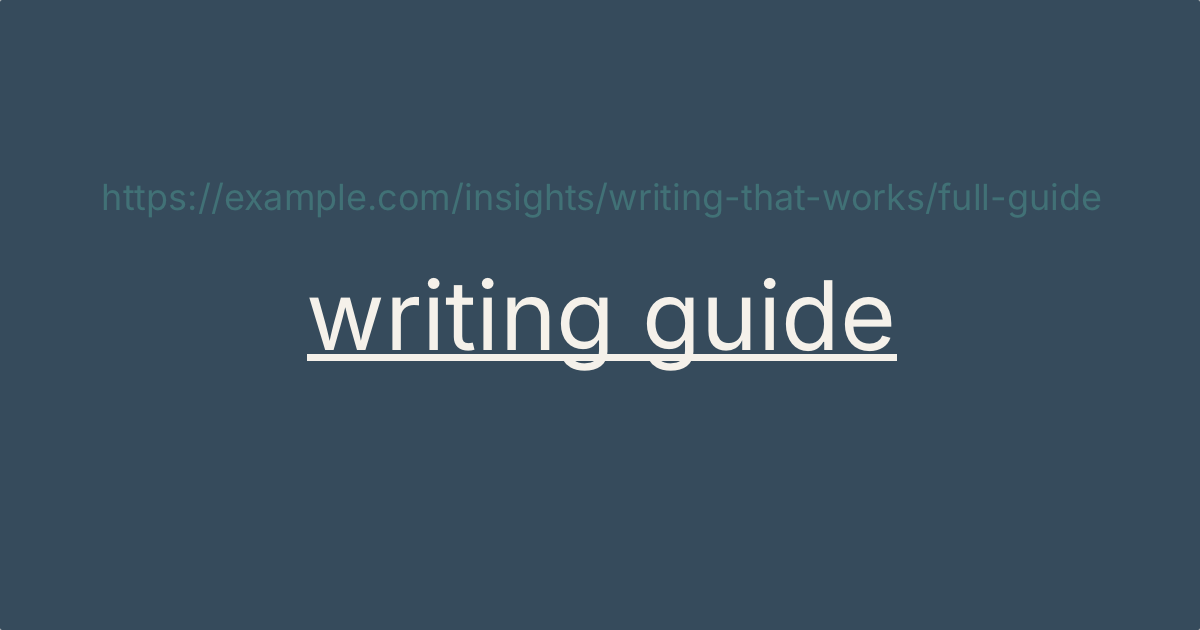
The crude option is to paste the full web address into your text. It has one virtue. Even a reader who is only scanning can see that a link is there. But a raw URL is rarely short or readable, it breaks the flow of the sentence, and it often gives no clue where it leads. A shortening service such as Bitly will fix the length, and a paid plan can brand the link to your organisation, but a short URL is still a string of characters sitting awkwardly in your prose.
Better to attach the address to some anchor text: a word or phrase in your sentence that carries the link. Now the sentence reads normally, and the formatting tells the reader there is something to click.
Getting the anchor text right takes a little care. Here are six tips to help you.
- Keep it short. Five words or fewer. One or two words can work, but a reader moving quickly may miss them.
- Describe the destination. The anchor text should tell the reader where the link goes. Never use "click here". It describes the action, not the destination, and makes the reader hunt around it to find out what they are clicking.
- Use a verb where it fits. "Read the guidance" or "see the consultation paper" gives an action-oriented link. Where a verb does not fit, the title of the document works as anchor text instead.
- Use links sparingly. Include only the ones that add something. A link in every sentence is as tiring to read as a page of raw URLs.
- Keep the formatting consistent. Your app's default link style already works. If you change the colour or font, change it for every link in the document. Otherwise the reader cannot tell what is a link and what is not.
- Make the anchor text stand on its own. People using a screen reader often call up a list of a page's links, stripped of the surrounding sentences. "Click here" and "read more", repeated down the list, tell them nothing. Anchor text that names its destination is what makes a link accessible.